In most cases, yes. What you need to do depends on your ticket type, and you can change a will call name until 12 hours before the event starts.
Find your ticket type
| Your ticket | Do you need to change the name? |
|---|---|
| Barcoded ticket (print-at-home or physical) | No. Just give the ticket to your friend. You don't need to update the name on your purchase. |
| Will call | Yes. Update the will call name in your Prekindle account before the event (steps below). |
| Guest list or complimentary | Names can't be changed. |
How to change the will call name
| 1 | Log in at prekindle.com/support/portal with the email you used at checkout. No account yet? Create one with that same email and your past orders will show up. |
| 2 | Click Your Orders in the menu. |
| 3 | Find the event and click Update purchase. |
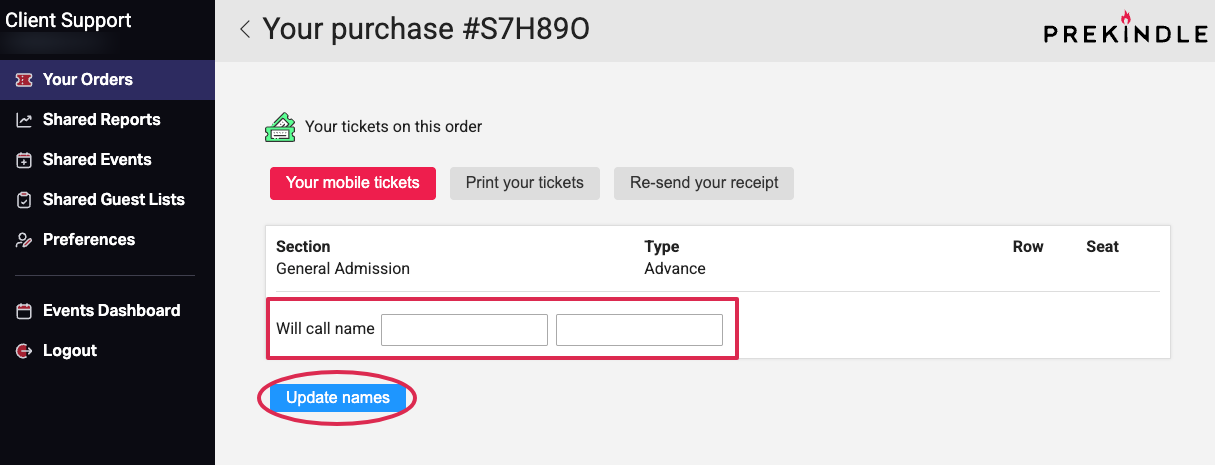
| 4 | Type the new will call name. |
| 5 | Click Update names to save. Repeat for each ticket if needed. |
Deadline: 12 hours before the event. Will call names can't be changed within 12 hours of the event start time, so event staff have the final list. Need a last-minute change? Contact support below to see what's possible.
Check the event's rules first
- Some event organizers and venues don't allow name changes, ticket transfers, or will call updates.
- Some events require the attendee's government-issued photo ID to match the name on the ticket, order, or will call pickup.
- Entry requirements are set by the event organizer and venue. Before you buy, transfer, or update a ticket, check the event page and the venue's website.
All purchases are subject to the Prekindle Terms of Use. Ticket buyers are responsible for entering accurate information at checkout and for reviewing event and venue requirements. Organizers and venues may refuse entry if their requirements aren't met.
Still need help? Log in with the email you used at checkout so we can find your order quickly.
Contact Prekindle SupportWas this article helpful?
That’s Great!
Thank you for your feedback
Sorry! We couldn't be helpful
Thank you for your feedback
Feedback sent
We appreciate your effort and will try to fix the article