Your tickets are in your receipt email from tickets@prekindle.com, and you can always get them again by logging in to your Prekindle orders at prekindle.com/support/portal. Can't find them? Find what you're seeing below.
Find your situation
| What you're seeing | What it usually means | What to do |
|---|---|---|
| No email from Prekindle at all | It was filtered to spam or promotions, it went to a different inbox, or the email address was mistyped at checkout. | Search every folder for tickets@prekindle.com in the inbox you used at checkout. Still nothing? Log in and resend it (below). If you think the email was mistyped, contact support. |
| A receipt, but no tickets attached | The event uses Delayed Delivery, or it's a will call only event. | Check your receipt and the event page to see which one applies, then read the matching row below. |
| A note that your tickets will be delivered later | Delayed Delivery. Tickets are emailed 24 hours before showtime. This is normal. | Nothing until then. Delivery can take up to 30 minutes once it starts. See What is Delayed Delivery?. |
| It's less than 24 hours to showtime and Delayed Delivery tickets haven't arrived | Delivery may still be finishing, or it went to spam. | Wait the full 30 minutes, check spam, then log in at prekindle.com/support/portal and submit a request. |
| A will call only event | No ticket is sent. You'll pick up your tickets at the venue's box office. | Requirements vary by venue: you may be asked for a photo ID, your confirmation email, or your name. See What is will call?. |
| You deleted the email | Your tickets are still in your account. | Log in and resend it (below). |
Log in and get your tickets yourself
You can access all your Prekindle purchases any time, even without a password. Use the same email address you used at checkout.
| Option | How it works | Best for |
|---|---|---|
| One-time login link (recommended) | Go to prekindle.com/support/portal and enter the email from your purchase. We'll email you a one-time login link; no password needed. | Getting to your tickets fast |
| Create an account with a password | At prekindle.com/support/portal, sign up, then click the activation link in your confirmation email. | Full access from any device |
| Already have a password? | Log in at prekindle.com/login. | Returning customers |
Then:
| 1 | Click Your Orders and find the event under Upcoming Events. |
| 2 | Click Update Purchase. |
| 3 | Choose Re-send your receipt, or download your print-at-home or mobile tickets right there. |
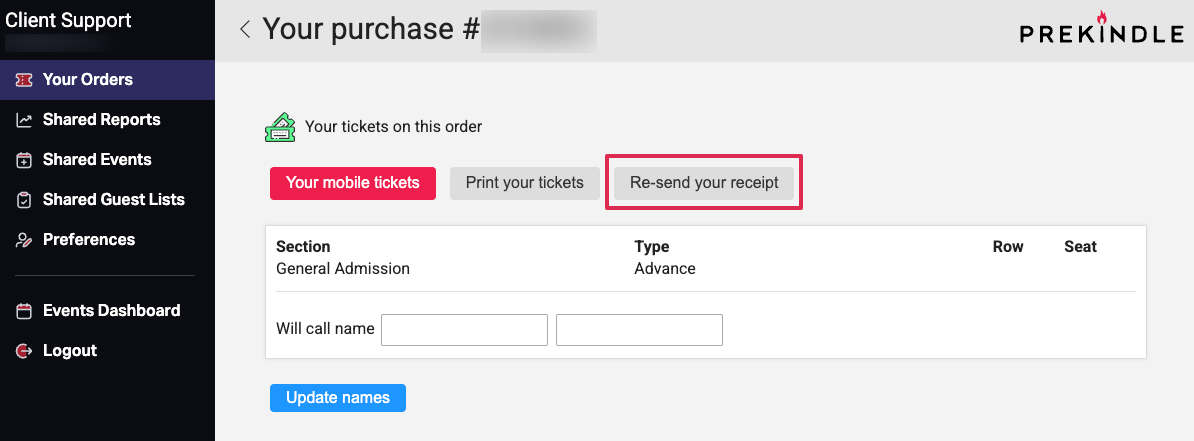 [ Your Orders → Update Purchase → Re-send your receipt ]
Once you're logged in, you can also
- View and manage current and past purchases
- Resend receipts and download print-at-home tickets
- Change the will call name on an order
- Contact our support team about a specific order
Still need help? Log in with the email you used at checkout so we can find your order quickly.
Contact Prekindle SupportWas this article helpful?
That’s Great!
Thank you for your feedback
Sorry! We couldn't be helpful
Thank you for your feedback
Feedback sent
We appreciate your effort and will try to fix the article