In most cases, yes.
If you have a barcoded ticket, you do not need to update the name on your purchase in order to give your tickets to a friend. This includes physical tickets as well as print-at-home tickets.
For will call tickets, the will call name can typically be updated through your Prekindle account before the event.
Important Venue & Event Policies
Please note that some event organizers and venues do not allow ticket name changes, ticket transfers, or will call updates. Additionally, some events may require the attendee's government-issued photo ID to match the name associated with the ticket, order, or will call pickup.
Entry requirements are determined by the event organizer and/or venue. Before purchasing, transferring, or attempting to update a ticket, please review the event page and venue website for any specific ticketing, transfer, or identification requirements.
Deadline for Name Changes
To ensure event staff have the most up-to-date will call information, will call names cannot be changed within 12 hours of the event start time.
If you have a last-minute name change request, please contact Customer Support for available options: https://www.prekindle.com/support/portal
Additional Terms & Conditions
All ticket purchases are subject to the Prekindle Terms of Use: https://www.prekindle.com/terms-of-use
Ticket buyers are responsible for providing accurate information during purchase and for reviewing event and venue requirements. Event organizers and venues may establish their own admission policies, including identification requirements, and may refuse entry if those requirements are not met.
How do I change the will call name on my tickets?
To change the will call name on a ticket, you must log into your Prekindle account. If you do not have an active account, you can create one using the same email address associated with your purchase.
To access purchases made prior to creating your Prekindle account, be sure to use the same email address used for your previous purchases.
- Log in to your Prekindle account.
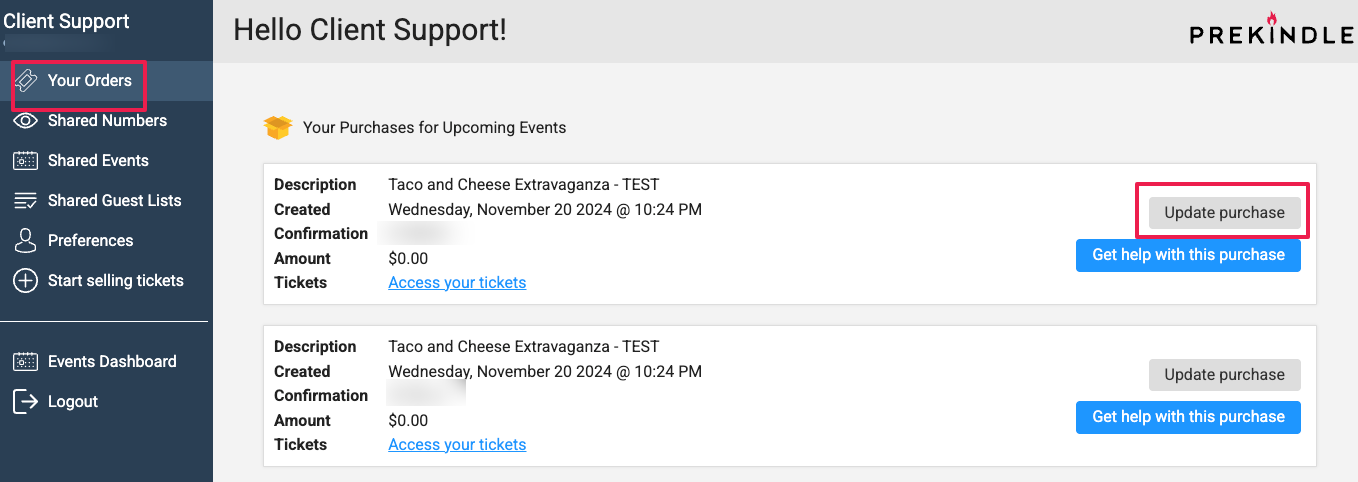
- Click Your Orders in the navigation menu.
- Locate the event and click Update Purchase.
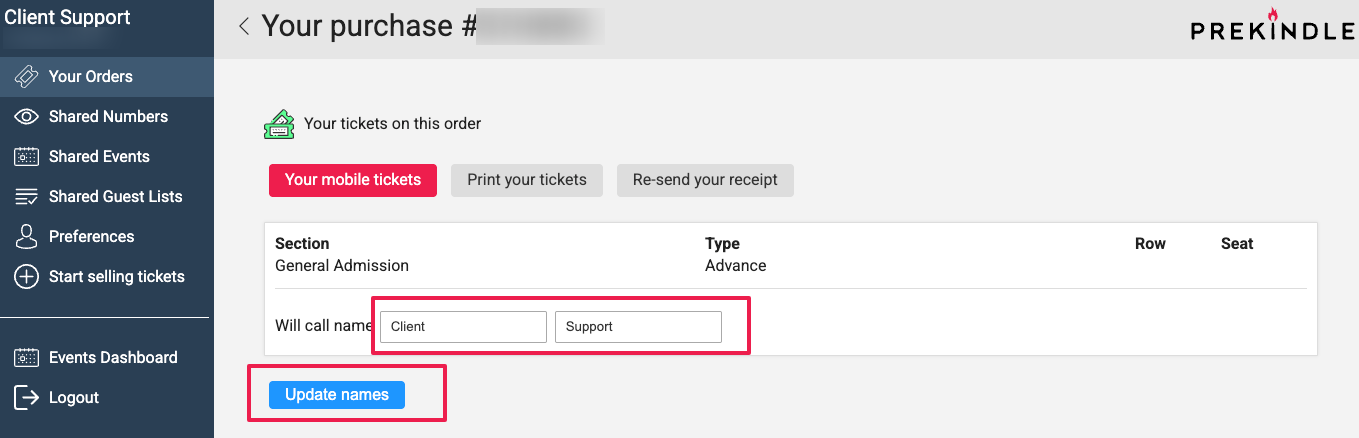
- Enter the new will call name.
- Click Update Names to save your changes.
- Repeat for each ticket as needed.
Please note: Names on guest list or complimentary tickets cannot be changed.
Was this article helpful?
That’s Great!
Thank you for your feedback
Sorry! We couldn't be helpful
Thank you for your feedback
Feedback sent
We appreciate your effort and will try to fix the article