Yes. Log in at prekindle.com/support/portal with the email you used at checkout, then go to Your Orders → Update purchase → Resend your receipt. A new copy is sent from tickets@prekindle.com.
First, check your inbox
- Search every folder, including spam and promotions, for tickets@prekindle.com. Receipts sometimes land there.
- Make sure you're checking the inbox you used at checkout.
Resend your receipt
| 1 | Go to prekindle.com/support/portal and enter the email from your purchase. We'll email you a one-time login link, so no password is needed. Already have a password? Log in at prekindle.com/login. |
| 2 | Click Your Orders and find the event under Upcoming Events. For an event that already happened, click Show/hide past purchases. |
| 3 | Click Update purchase. |
| 4 | Click Resend your receipt. |
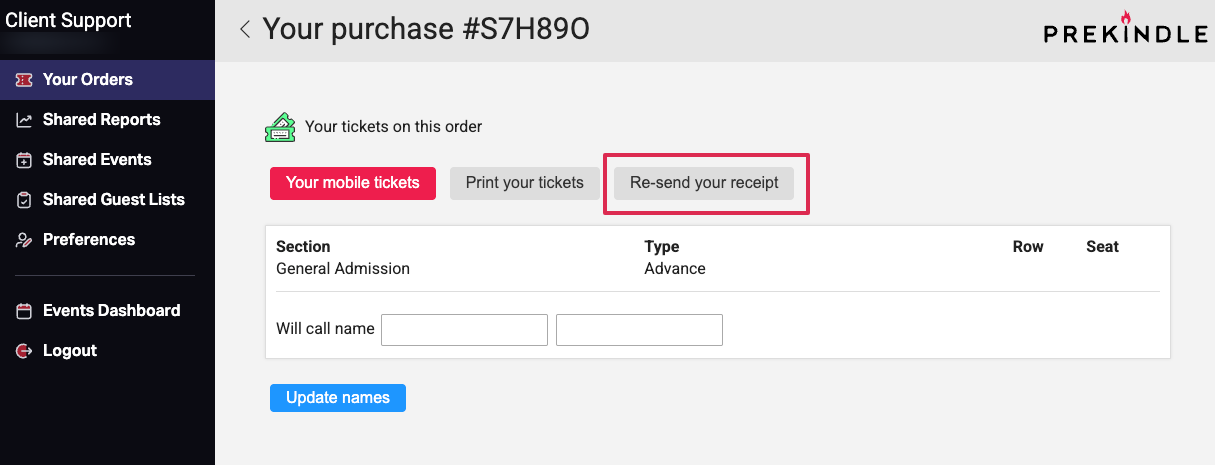
Just need your tickets? On that same page, click Your mobile tickets or Print your tickets. No email needed.
Good to know
- No tickets attached to your receipt? The event uses Delayed Delivery (tickets arrive 24 hours before showtime) or is will call only (pick up at the venue). See Where Are My Tickets?.
- Don't see the order? It's tied to the email used at checkout. If you used a different email, log in with that one.
- Think your email was mistyped at checkout? We can't resend to the wrong address, so contact support below and we'll help.
Still need help? Log in with the email you used at checkout so we can find your order quickly.
Contact Prekindle SupportWas this article helpful?
That’s Great!
Thank you for your feedback
Sorry! We couldn't be helpful
Thank you for your feedback
Feedback sent
We appreciate your effort and will try to fix the article