Overview
Promo codes allow you to offer discounts or special pricing to specific customers. You can create, edit, and apply promo codes for your event ticket sales in Prekindle.
How to Add a Promo Code
Log in to your Prekindle dashboard
Ensure you have access to manage events with the appropriate user role.
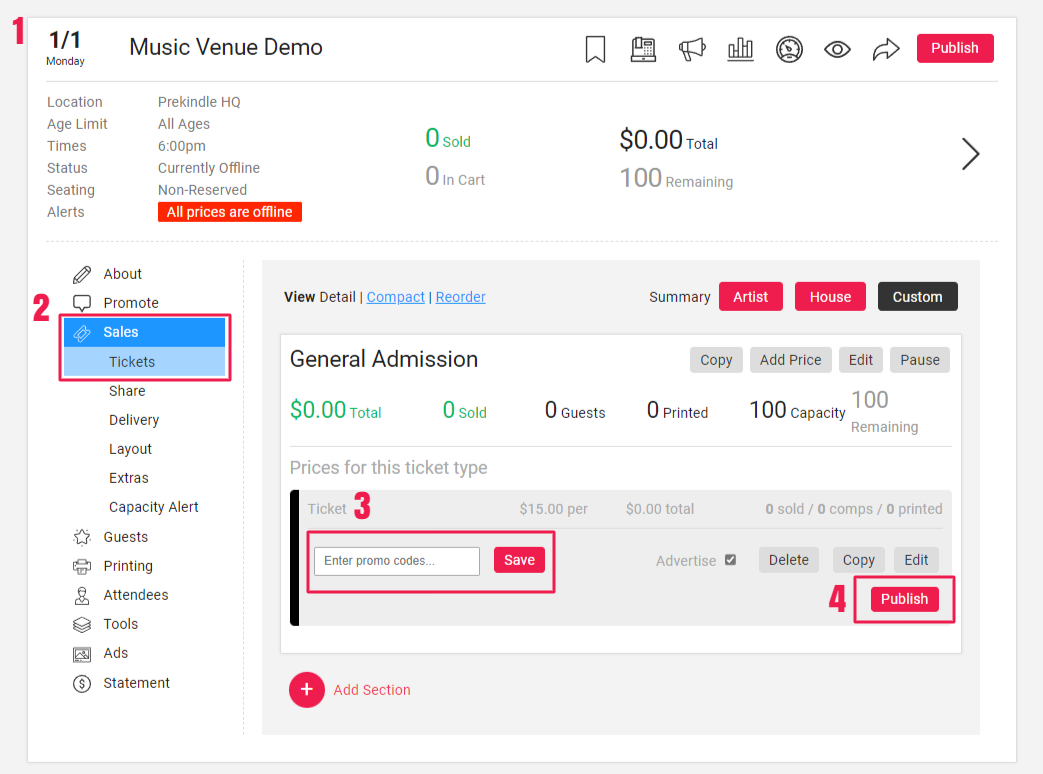
Navigate to the Event
Go to the event where you want to add a promo code.Click Sales; Tickets
Find the ticket you'd like to add the promo code to. If you need to create a new ticket or a new price, click Add Section or Add Price.Enter the Promo Code
Promo Codes are not case sensitive, and multiple codes can be entered by separating codes with a comma. Click Save.Click Publish
Once the price is published, customers will be able to enter the promo code during the purchase flow and unlock this ticket
Learn more here: Adding a Promo Code
Was this article helpful?
That’s Great!
Thank you for your feedback
Sorry! We couldn't be helpful
Thank you for your feedback
Feedback sent
We appreciate your effort and will try to fix the article