Overview
If a customer needs another copy of their tickets or order receipt, you can resend them directly from the Box Office Search tool in your Prekindle dashboard. The resend email includes both the tickets and the receipt in a single message.
This action can be used for:
- Guest list tickets
- Online purchases
- Box office purchases
Step-by-Step Instructions
Log in to your Prekindle dashboard
Make sure you are logged in with a role that has access to Box Office tools, such as Admin, Manager, or Box Office.Open Box Office
Box Office can be opened in either of the following ways:
- From the left side navigation panel, click Box Office.
- From within an event, click the cash register icon to launch Box Office.
Search for the purchase or guest entry
Use the Search field to locate the order or guest list entry using one of the following:Customer name
Email address
Confirmation code
Ticket barcode
Guest list note
Open the order or entry
Click Select next to the correct search result to open the details.Resend the tickets and receipt
Click the Resend Receipt button within the order actions. The email sent to the customer will include both their tickets and their receipt.Confirm delivery
A "Receipt sent successfully." notification will appear when the email has been sent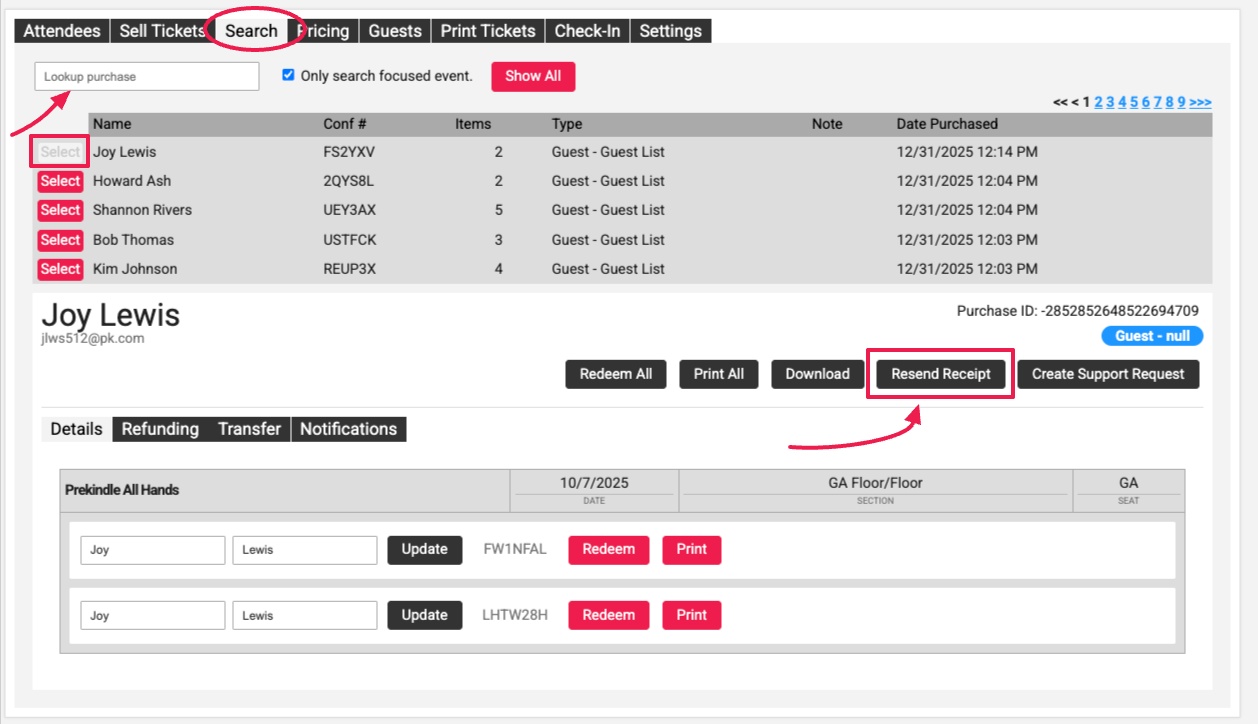
Helpful Notes
- Tickets and receipts are sent together in the same email.
- This action does not change the order, ticket status, or delivery method.
- Resending applies to guest list entries, online ticket purchases, and box office purchases.
- The email is sent to the address associated with the original order or guest entry.
- If the customer is still having trouble finding the email, verify that they are checking the correct inbox, that the email address was entered correctly, and that the email did not land in their spam folder.
When to Use This Feature
- A customer deleted or misplaced their tickets or receipt.
- A customer did not receive the original email.
- A duplicate copy is needed for records or reimbursement.
- Proof of purchase or entry is requested.
Was this article helpful?
That’s Great!
Thank you for your feedback
Sorry! We couldn't be helpful
Thank you for your feedback
Feedback sent
We appreciate your effort and will try to fix the article